Vigay.com02
Sep
Search Vigay.com


TextTidy

TextTidy
Download:TextTidy.zip [13K]
Downloaded:189 times
Version:1.03 (17th Feb 2009)
32-bit:Yes
Requirements:RISC OS 2 or above
40K wimpslot
Licence:Freeware

Purpose

A small application to strip control codes or linefeeds from text files that may have been transferred from PC applications to the Acorn.

TextTidy will also convert non-HTML friendly characters into the correct HTML entities, so that you can convert text files into HTML files.
Screenshots

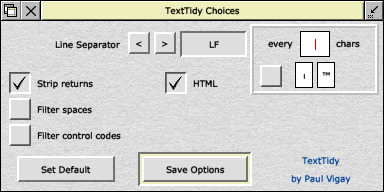
TextTidy choices
The Choices window.


Comment posted by bible experience on 29th Mar 2010 @ 6:19pm

Last bit of code I want to show is the flashing animation for the arrows. To get that effect, I used the JQuery animate effect with a callback function pointing to the same method, so it gets called infinitely. When the mouse is away from the arrow, we call the JQuery stop effect to stop all animations.

function StopFlashing(obj) {

$(obj).stop(true).css("opacity", "show");

}

function StartFlashing(obj) {

$(obj).animate({ "opacity": "toggle" }, "slow", "linear", function() { StartFlashing(obj); });

}

It’s a rather simplistic example but I’ve had good fun exploring the power of JQuery. With my limited knowledge, I’m pretty happy with this example. I’m sure there’s better implementations of the same functionality, and if you do find some, please let me know. Happy Coding.

Comment posted by leather sandals on 29th Mar 2010 @ 6:20pm

I have solved my problem with adding two line of code

The new funciton will be…

static public string CleanString(string s)

{

if (s != null && s.Length > 0)

{

StringBuilder sb = new StringBuilder(s.Length);

foreach (char c in s)

{

//sb.Append(Char.IsControl(c) ? ' ' : c);

if(Char.IsSymbol(c))

{

continue;

}

sb.Append(Char.IsLetterOrDigit(c) ? c : ' ');

}

s = sb.ToString();

}

return s;

}

Comment posted by bad credit car loan on 13th May 2010 @ 7:05pm

use php. Change the extension of your .html file to .php, and paste the following code where you want your text to appear.

$filename="text_file.txt";

$handle=fopen($filename,"r");

$contents=fread

($handle,filesize($filename));

echo($contents);

?>

change $filename to your text file, include the directory inside the quotes. eg. "text_folder/my_text_file.txt"

and I had to put the $contents=fread on two lines because it was breaking. Put those two lines back on one.

Add a comment to this article

I am sorry to report that no further comments are to be left for articles here. We thank you for past comments. This feature has been disabled.

Email Email this page to a friend

Last edit: 15th Dec 2009 at 6:40pm
(261 days ago)

Bookmark with:What are these?
delicious Deliciousdigg Diggreddit redditfacebook Facebookstumbleupon StumbleUpon

RSS Feed

Viewed 4109 times since 27th Jun 2006,
~ 2 views per day

^
 
Valid HTML 4.01!
Valid CSS!
Best viewed with a cup of tea Crafted by RISC OS